
Sales Performance & Pipeline
Sales Performance & Pipeline
Ensure revenue goals are met and predictable.
Ensure revenue goals are met and predictable.

Sales Pipeline Dashboard
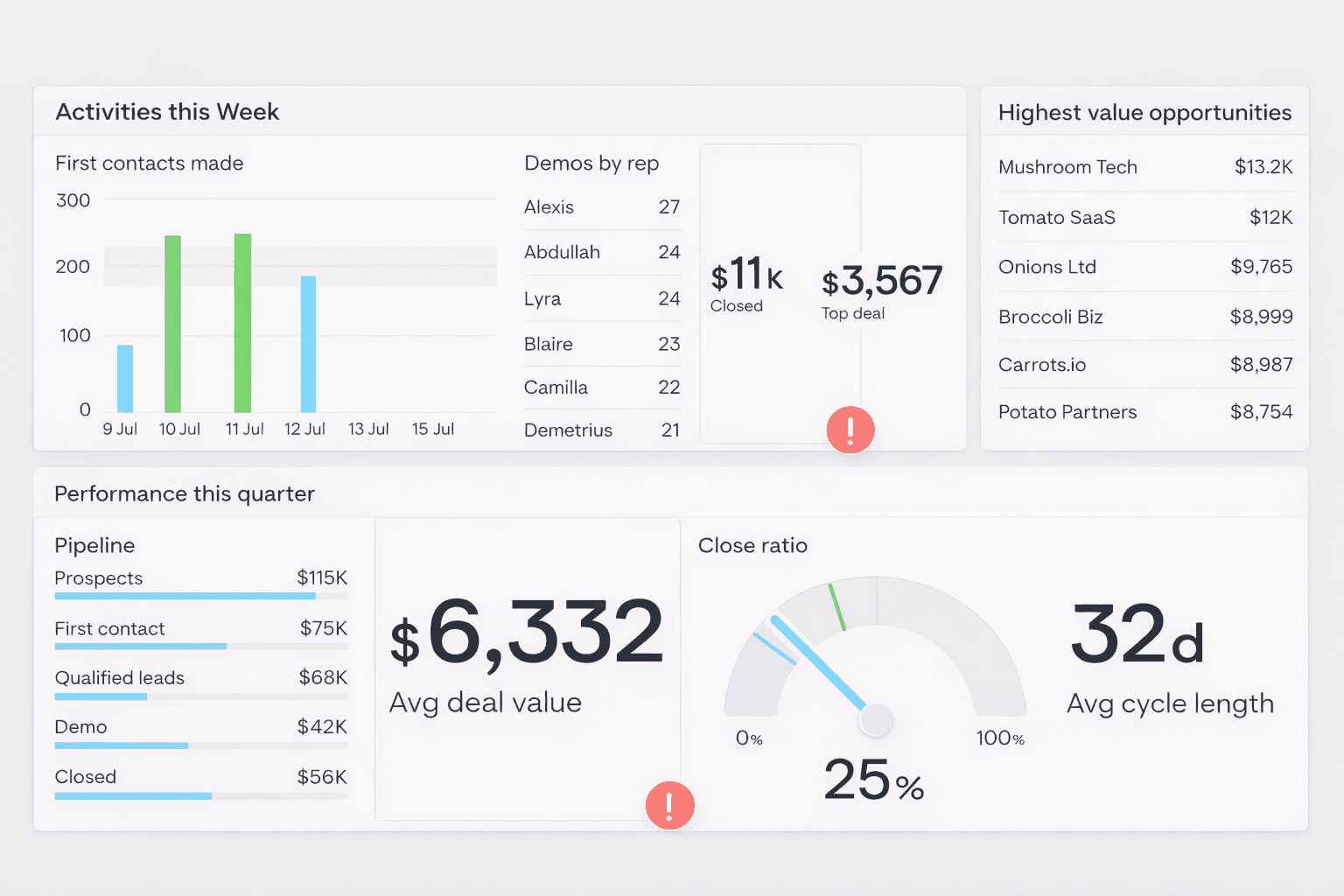
This sales pipeline dashboard is split into two timeframes.
The top section shows sales activity from the past week, including first contacts, demos by rep, and closed deals. This helps sales reps quickly see whether they’re on track to hit target or need to increase activity. A demos-by-rep leaderboard encourages healthy competition around a key conversion-driving activity.
The bottom section focuses on quarterly performance. A pipeline bar chart shows how deals move through each stage, making it easy for sales managers to spot bottlenecks or stalled opportunities.
Longer-term metrics like close rate and average deal cycle keep the team aligned on overall goals, not just daily tasks.
Tracking Orders vs Invoices
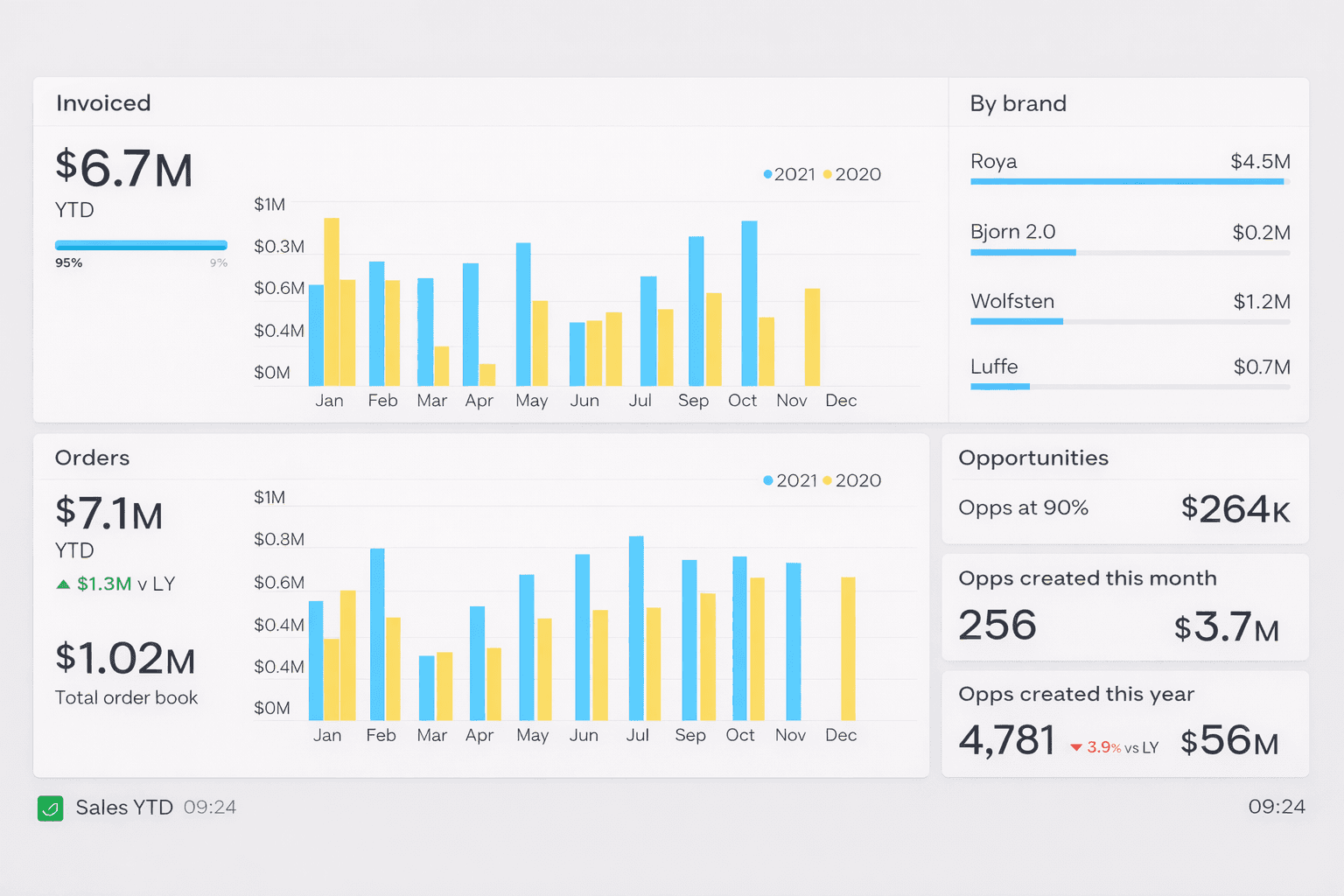
Many Sales Managers need to track metrics at multiple points of the sales process. The dashboard above is used by a company which supplies new offices and buildings with designer furniture. As a result, there is normally a 2-3 month gap between orders being placed and the actual installation of the product, at which point the invoice is issued. This means their dashboard needs to track both invoices issued and orders completed each month. The ‘total order book’ refers to orders which have been placed which have not yet been invoiced.
Live Monitoring Dashboard
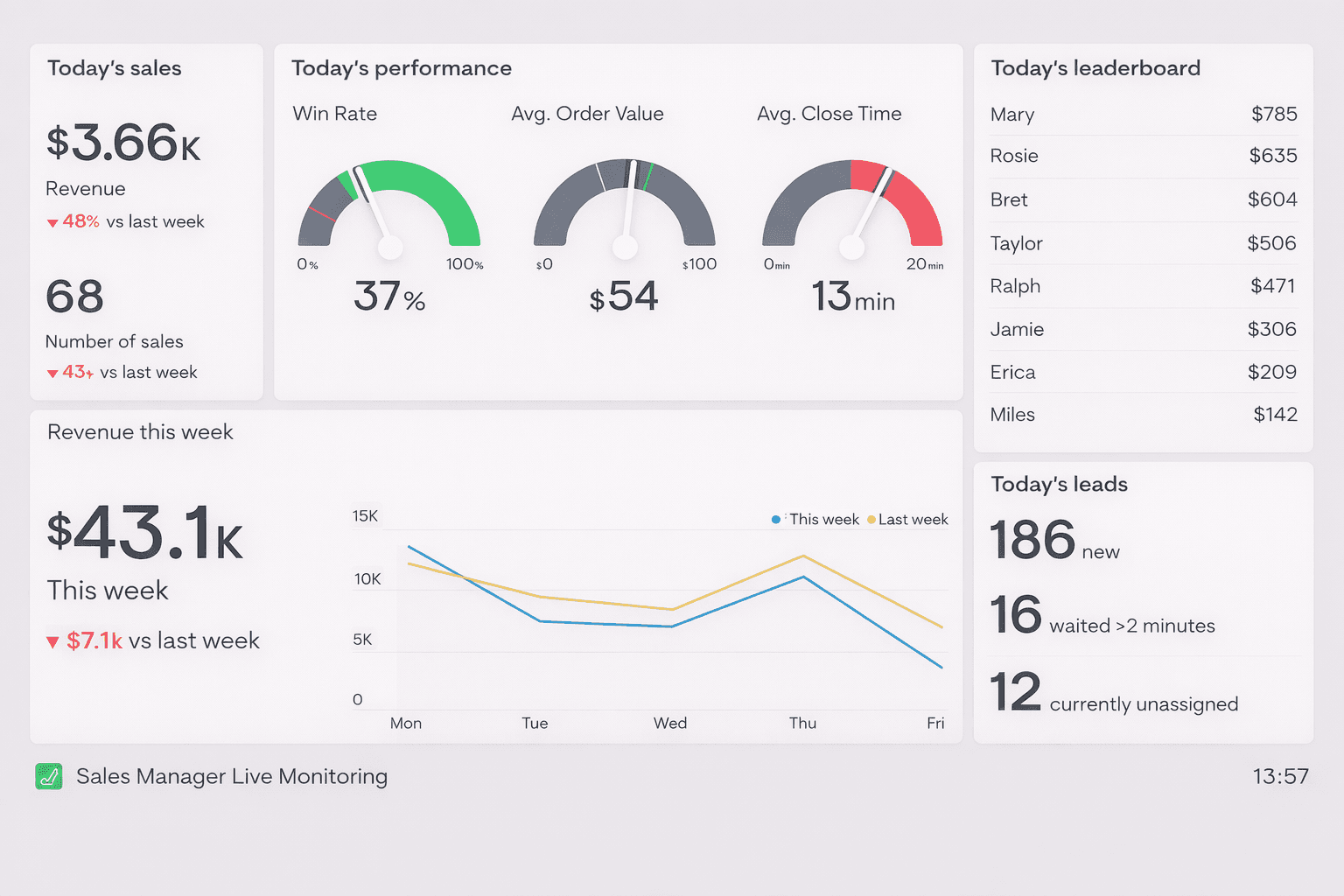
This dashboard is used by a Sales Manager who manages a sales team, which is set up to process a high volume of inbound leads. In a fast-moving environment, there’s a much greater need to monitor the status of current performance and respond to issues as they arise. As a result, this dashboard focuses on important real-time metrics such as Avg. Close Time and Currently Unassigned Leads.
Team Overview Dashboard
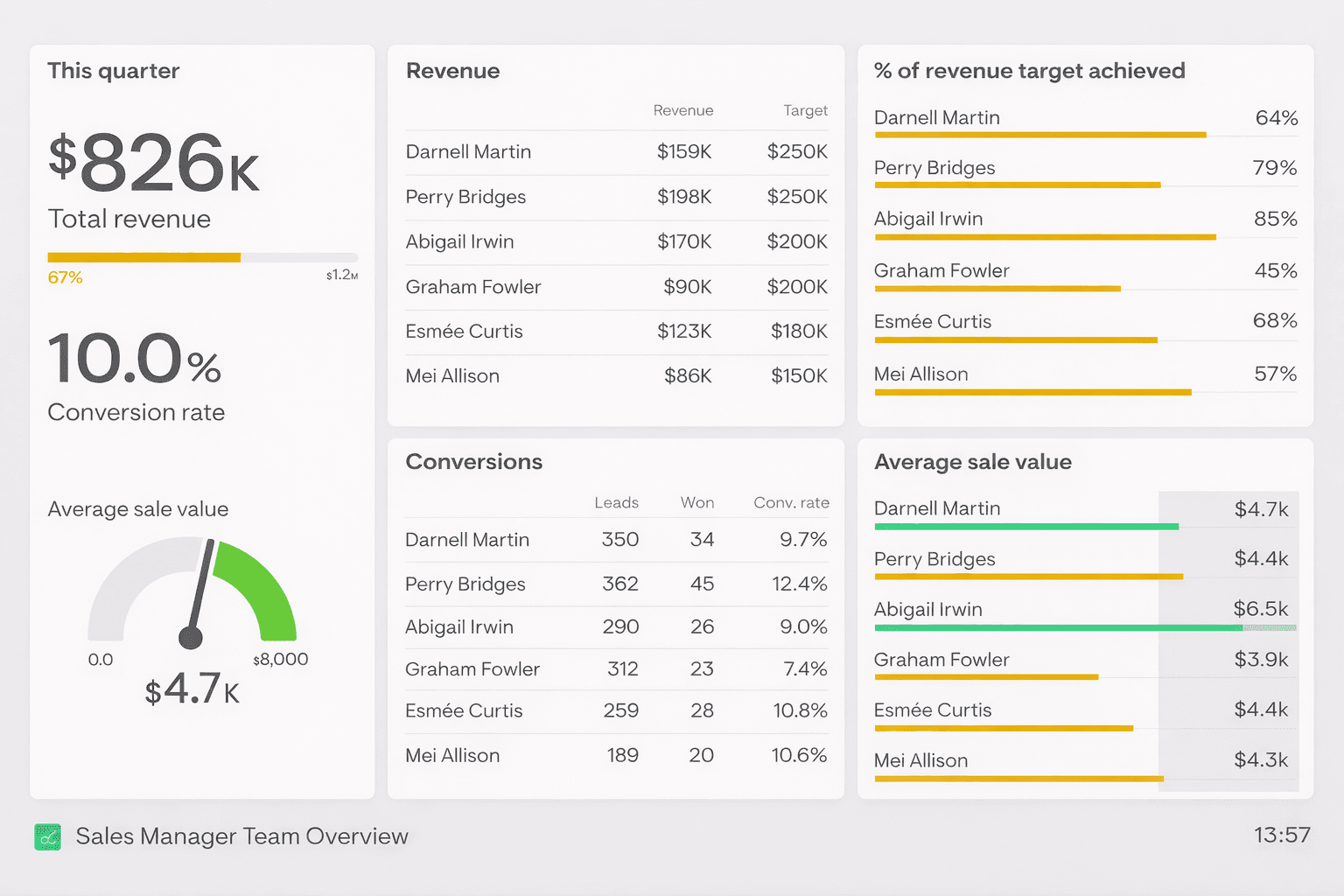
This dashboard focuses on the Sales Manager’s responsibility to manage and support their direct reports. It gives a clear overview of how individuals are progressing towards their targets, meaning the Sales Manager can quickly identify issues and provide extra support when needed. In addition to overall revenue targets, this dashboard shows secondary metrics such as conversion rate and average order value. This Sales Manager has decided to create a benchmark for what they consider to be a good Average Sale Value ($4.5k), perhaps to focus the team’s attention on upselling and/or high-value customers.
Monthly KPI Dashboard
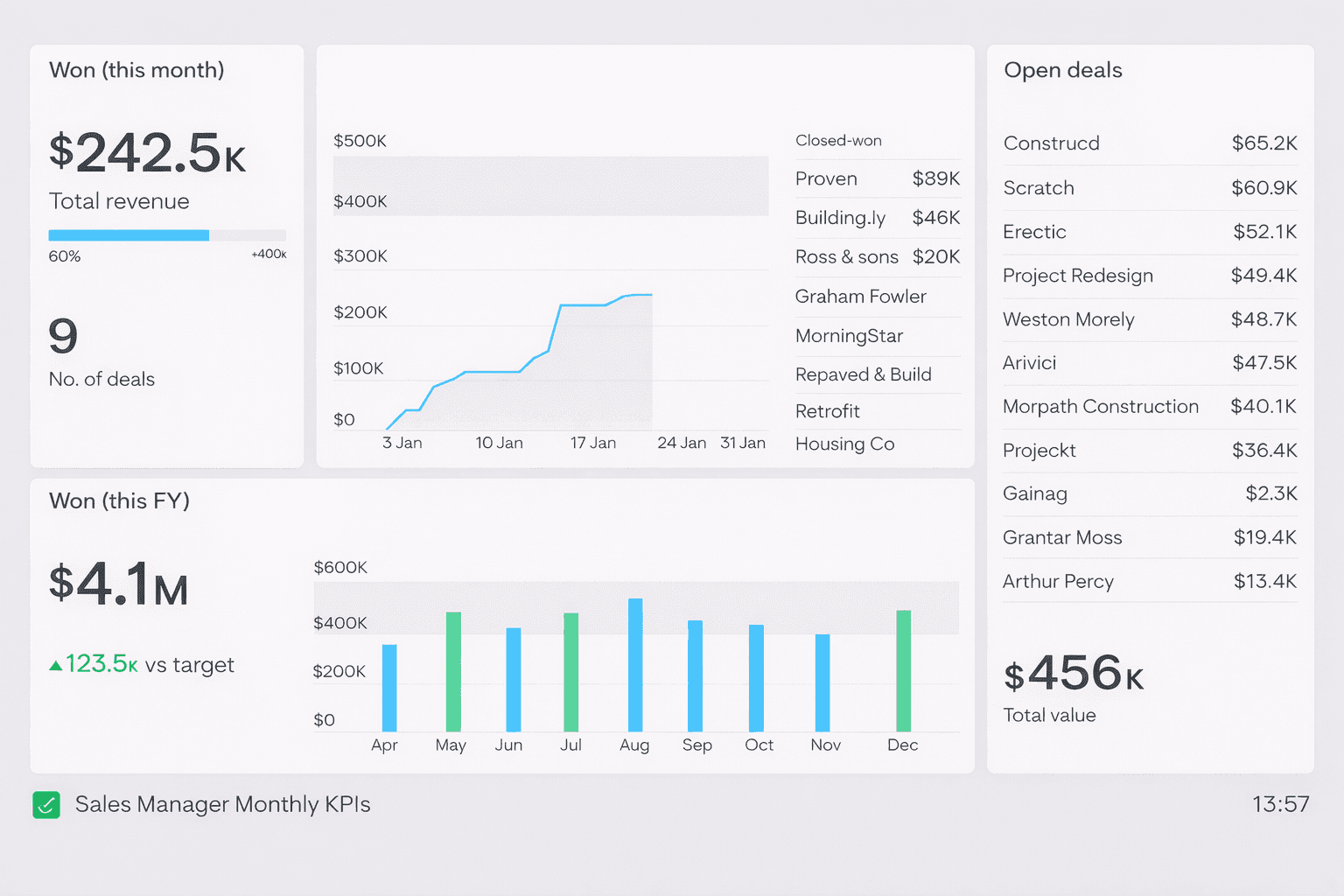
This dashboard focuses on the Sales Manager’s progress toward their monthly revenue targets. They can quickly track performance so far, including the deals that have been closed. The dashboard also shows the total value of the immediate pipeline, including the accounts that make up the pipeline. This helps them to calibrate how likely it is they will hit their monthly targets, or if they need to take a different course of action. For added context, the dashboard also includes revenue figures from previous months, including a green status indicator showing the months where the target has been achieved.
HubSpot Deals Dashboard
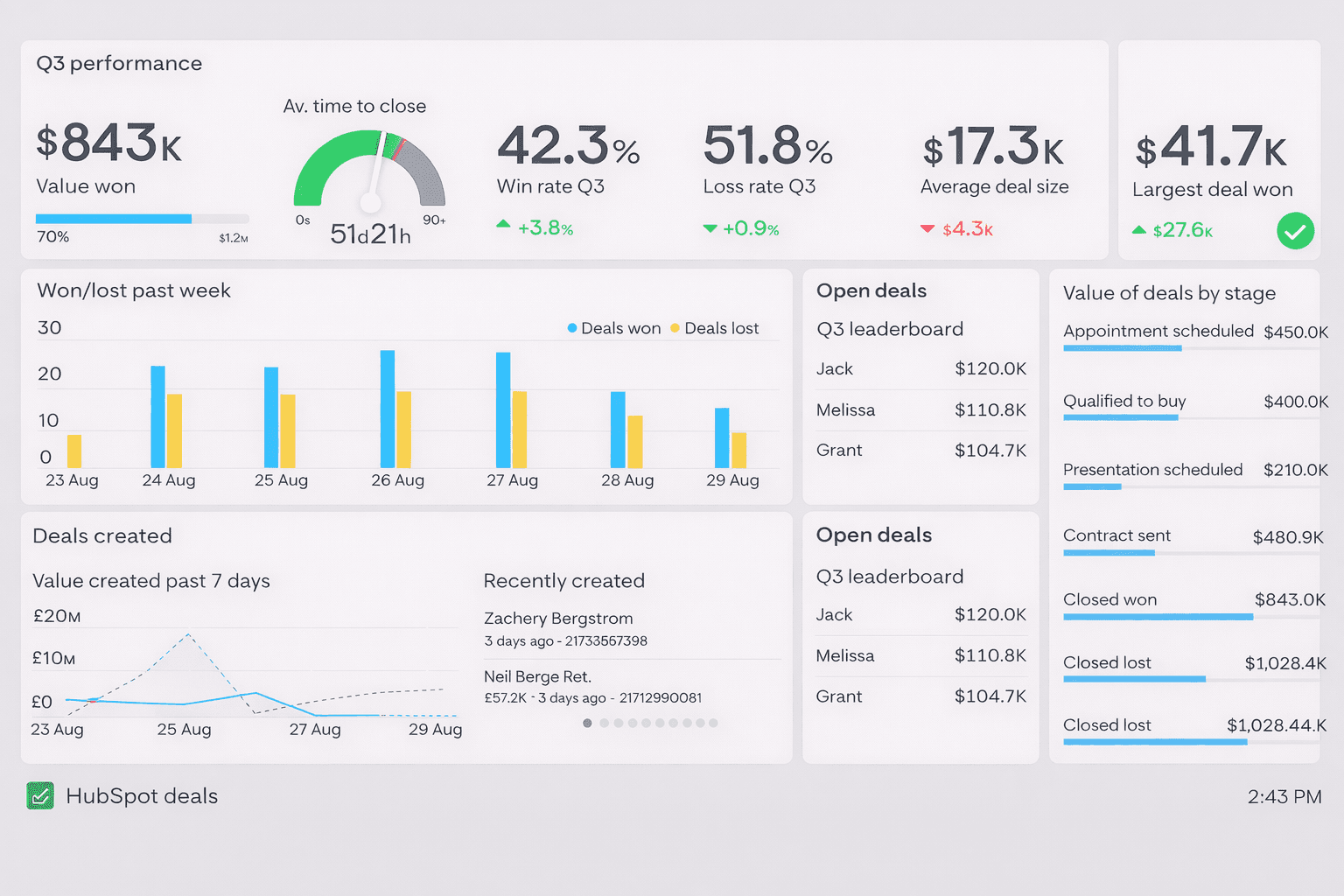
This dashboard is focused around important deal metrics and other useful information that can give a team a quick insight into how deals are progressing.
Along the top row is a series of performance data relating to how the team is performing over the quarter. KPIs like win rate, loss rate, average time to close, average deal size and largest deal won give the team a quick understanding of how they’re performing relative to the previous quarter. Placing their main goal in the top left of the dashboard - winning $1.2 million in value - is great dashboard design best practice.
Sales Pipeline Dashboard
This sales pipeline dashboard is split into two timeframes.
The top section shows sales activity from the past week, including first contacts, demos by rep, and closed deals. This helps sales reps quickly see whether they’re on track to hit target or need to increase activity. A demos-by-rep leaderboard encourages healthy competition around a key conversion-driving activity.
The bottom section focuses on quarterly performance. A pipeline bar chart shows how deals move through each stage, making it easy for sales managers to spot bottlenecks or stalled opportunities.
Longer-term metrics like close rate and average deal cycle keep the team aligned on overall goals, not just daily tasks.
Tracking Orders vs Invoices
Many Sales Managers need to track metrics at multiple points of the sales process. The dashboard above is used by a company which supplies new offices and buildings with designer furniture. As a result, there is normally a 2-3 month gap between orders being placed and the actual installation of the product, at which point the invoice is issued. This means their dashboard needs to track both invoices issued and orders completed each month. The ‘total order book’ refers to orders which have been placed which have not yet been invoiced.
Live Monitoring Dashboard
This dashboard is used by a Sales Manager who manages a sales team, which is set up to process a high volume of inbound leads. In a fast-moving environment, there’s a much greater need to monitor the status of current performance and respond to issues as they arise. As a result, this dashboard focuses on important real-time metrics such as Avg. Close Time and Currently Unassigned Leads.
Team Overview Dashboard
This dashboard focuses on the Sales Manager’s responsibility to manage and support their direct reports. It gives a clear overview of how individuals are progressing towards their targets, meaning the Sales Manager can quickly identify issues and provide extra support when needed. In addition to overall revenue targets, this dashboard shows secondary metrics such as conversion rate and average order value. This Sales Manager has decided to create a benchmark for what they consider to be a good Average Sale Value ($4.5k), perhaps to focus the team’s attention on upselling and/or high-value customers.
Monthly KPI Dashboard
This dashboard focuses on the Sales Manager’s progress toward their monthly revenue targets. They can quickly track performance so far, including the deals that have been closed. The dashboard also shows the total value of the immediate pipeline, including the accounts that make up the pipeline. This helps them to calibrate how likely it is they will hit their monthly targets, or if they need to take a different course of action. For added context, the dashboard also includes revenue figures from previous months, including a green status indicator showing the months where the target has been achieved.
HubSpot Deals Dashboard
This dashboard is focused around important deal metrics and other useful information that can give a team a quick insight into how deals are progressing.
Along the top row is a series of performance data relating to how the team is performing over the quarter. KPIs like win rate, loss rate, average time to close, average deal size and largest deal won give the team a quick understanding of how they’re performing relative to the previous quarter. Placing their main goal in the top left of the dashboard - winning $1.2 million in value - is great dashboard design best practice.
Sales Pipeline Dashboard
This sales pipeline dashboard is split into two timeframes.
The top section shows sales activity from the past week, including first contacts, demos by rep, and closed deals. This helps sales reps quickly see whether they’re on track to hit target or need to increase activity. A demos-by-rep leaderboard encourages healthy competition around a key conversion-driving activity.
The bottom section focuses on quarterly performance. A pipeline bar chart shows how deals move through each stage, making it easy for sales managers to spot bottlenecks or stalled opportunities.
Longer-term metrics like close rate and average deal cycle keep the team aligned on overall goals, not just daily tasks.
Tracking Orders vs Invoices
Many Sales Managers need to track metrics at multiple points of the sales process. The dashboard above is used by a company which supplies new offices and buildings with designer furniture. As a result, there is normally a 2-3 month gap between orders being placed and the actual installation of the product, at which point the invoice is issued. This means their dashboard needs to track both invoices issued and orders completed each month. The ‘total order book’ refers to orders which have been placed which have not yet been invoiced.
Live Monitoring Dashboard
This dashboard is used by a Sales Manager who manages a sales team, which is set up to process a high volume of inbound leads. In a fast-moving environment, there’s a much greater need to monitor the status of current performance and respond to issues as they arise. As a result, this dashboard focuses on important real-time metrics such as Avg. Close Time and Currently Unassigned Leads.
Team Overview Dashboard
This dashboard focuses on the Sales Manager’s responsibility to manage and support their direct reports. It gives a clear overview of how individuals are progressing towards their targets, meaning the Sales Manager can quickly identify issues and provide extra support when needed. In addition to overall revenue targets, this dashboard shows secondary metrics such as conversion rate and average order value. This Sales Manager has decided to create a benchmark for what they consider to be a good Average Sale Value ($4.5k), perhaps to focus the team’s attention on upselling and/or high-value customers.
Monthly KPI Dashboard
This dashboard focuses on the Sales Manager’s progress toward their monthly revenue targets. They can quickly track performance so far, including the deals that have been closed. The dashboard also shows the total value of the immediate pipeline, including the accounts that make up the pipeline. This helps them to calibrate how likely it is they will hit their monthly targets, or if they need to take a different course of action. For added context, the dashboard also includes revenue figures from previous months, including a green status indicator showing the months where the target has been achieved.
HubSpot Deals Dashboard
This dashboard is focused around important deal metrics and other useful information that can give a team a quick insight into how deals are progressing.
Along the top row is a series of performance data relating to how the team is performing over the quarter. KPIs like win rate, loss rate, average time to close, average deal size and largest deal won give the team a quick understanding of how they’re performing relative to the previous quarter. Placing their main goal in the top left of the dashboard - winning $1.2 million in value - is great dashboard design best practice.
Sales Pipeline Dashboard
This sales pipeline dashboard is split into two timeframes.
The top section shows sales activity from the past week, including first contacts, demos by rep, and closed deals. This helps sales reps quickly see whether they’re on track to hit target or need to increase activity. A demos-by-rep leaderboard encourages healthy competition around a key conversion-driving activity.
The bottom section focuses on quarterly performance. A pipeline bar chart shows how deals move through each stage, making it easy for sales managers to spot bottlenecks or stalled opportunities.
Longer-term metrics like close rate and average deal cycle keep the team aligned on overall goals, not just daily tasks.
Tracking Orders vs Invoices
Many Sales Managers need to track metrics at multiple points of the sales process. The dashboard above is used by a company which supplies new offices and buildings with designer furniture. As a result, there is normally a 2-3 month gap between orders being placed and the actual installation of the product, at which point the invoice is issued. This means their dashboard needs to track both invoices issued and orders completed each month. The ‘total order book’ refers to orders which have been placed which have not yet been invoiced.
Live Monitoring Dashboard
This dashboard is used by a Sales Manager who manages a sales team, which is set up to process a high volume of inbound leads. In a fast-moving environment, there’s a much greater need to monitor the status of current performance and respond to issues as they arise. As a result, this dashboard focuses on important real-time metrics such as Avg. Close Time and Currently Unassigned Leads.
Team Overview Dashboard
This dashboard focuses on the Sales Manager’s responsibility to manage and support their direct reports. It gives a clear overview of how individuals are progressing towards their targets, meaning the Sales Manager can quickly identify issues and provide extra support when needed. In addition to overall revenue targets, this dashboard shows secondary metrics such as conversion rate and average order value. This Sales Manager has decided to create a benchmark for what they consider to be a good Average Sale Value ($4.5k), perhaps to focus the team’s attention on upselling and/or high-value customers.
Monthly KPI Dashboard
This dashboard focuses on the Sales Manager’s progress toward their monthly revenue targets. They can quickly track performance so far, including the deals that have been closed. The dashboard also shows the total value of the immediate pipeline, including the accounts that make up the pipeline. This helps them to calibrate how likely it is they will hit their monthly targets, or if they need to take a different course of action. For added context, the dashboard also includes revenue figures from previous months, including a green status indicator showing the months where the target has been achieved.
HubSpot Deals Dashboard
This dashboard is focused around important deal metrics and other useful information that can give a team a quick insight into how deals are progressing.
Along the top row is a series of performance data relating to how the team is performing over the quarter. KPIs like win rate, loss rate, average time to close, average deal size and largest deal won give the team a quick understanding of how they’re performing relative to the previous quarter. Placing their main goal in the top left of the dashboard - winning $1.2 million in value - is great dashboard design best practice.
Sales Pipeline Dashboard
This sales pipeline dashboard is split into two timeframes.
The top section shows sales activity from the past week, including first contacts, demos by rep, and closed deals. This helps sales reps quickly see whether they’re on track to hit target or need to increase activity. A demos-by-rep leaderboard encourages healthy competition around a key conversion-driving activity.
The bottom section focuses on quarterly performance. A pipeline bar chart shows how deals move through each stage, making it easy for sales managers to spot bottlenecks or stalled opportunities.
Longer-term metrics like close rate and average deal cycle keep the team aligned on overall goals, not just daily tasks.
Tracking Orders vs Invoices
Many Sales Managers need to track metrics at multiple points of the sales process. The dashboard above is used by a company which supplies new offices and buildings with designer furniture. As a result, there is normally a 2-3 month gap between orders being placed and the actual installation of the product, at which point the invoice is issued. This means their dashboard needs to track both invoices issued and orders completed each month. The ‘total order book’ refers to orders which have been placed which have not yet been invoiced.
Live Monitoring Dashboard
This dashboard is used by a Sales Manager who manages a sales team, which is set up to process a high volume of inbound leads. In a fast-moving environment, there’s a much greater need to monitor the status of current performance and respond to issues as they arise. As a result, this dashboard focuses on important real-time metrics such as Avg. Close Time and Currently Unassigned Leads.
Team Overview Dashboard
This dashboard focuses on the Sales Manager’s responsibility to manage and support their direct reports. It gives a clear overview of how individuals are progressing towards their targets, meaning the Sales Manager can quickly identify issues and provide extra support when needed. In addition to overall revenue targets, this dashboard shows secondary metrics such as conversion rate and average order value. This Sales Manager has decided to create a benchmark for what they consider to be a good Average Sale Value ($4.5k), perhaps to focus the team’s attention on upselling and/or high-value customers.
Monthly KPI Dashboard
This dashboard focuses on the Sales Manager’s progress toward their monthly revenue targets. They can quickly track performance so far, including the deals that have been closed. The dashboard also shows the total value of the immediate pipeline, including the accounts that make up the pipeline. This helps them to calibrate how likely it is they will hit their monthly targets, or if they need to take a different course of action. For added context, the dashboard also includes revenue figures from previous months, including a green status indicator showing the months where the target has been achieved.
HubSpot Deals Dashboard
This dashboard is focused around important deal metrics and other useful information that can give a team a quick insight into how deals are progressing.
Along the top row is a series of performance data relating to how the team is performing over the quarter. KPIs like win rate, loss rate, average time to close, average deal size and largest deal won give the team a quick understanding of how they’re performing relative to the previous quarter. Placing their main goal in the top left of the dashboard - winning $1.2 million in value - is great dashboard design best practice.
Sales Pipeline Dashboard
This sales pipeline dashboard is split into two timeframes.
The top section shows sales activity from the past week, including first contacts, demos by rep, and closed deals. This helps sales reps quickly see whether they’re on track to hit target or need to increase activity. A demos-by-rep leaderboard encourages healthy competition around a key conversion-driving activity.
The bottom section focuses on quarterly performance. A pipeline bar chart shows how deals move through each stage, making it easy for sales managers to spot bottlenecks or stalled opportunities.
Longer-term metrics like close rate and average deal cycle keep the team aligned on overall goals, not just daily tasks.
Tracking Orders vs Invoices
Many Sales Managers need to track metrics at multiple points of the sales process. The dashboard above is used by a company which supplies new offices and buildings with designer furniture. As a result, there is normally a 2-3 month gap between orders being placed and the actual installation of the product, at which point the invoice is issued. This means their dashboard needs to track both invoices issued and orders completed each month. The ‘total order book’ refers to orders which have been placed which have not yet been invoiced.
Live Monitoring Dashboard
This dashboard is used by a Sales Manager who manages a sales team, which is set up to process a high volume of inbound leads. In a fast-moving environment, there’s a much greater need to monitor the status of current performance and respond to issues as they arise. As a result, this dashboard focuses on important real-time metrics such as Avg. Close Time and Currently Unassigned Leads.
Team Overview Dashboard
This dashboard focuses on the Sales Manager’s responsibility to manage and support their direct reports. It gives a clear overview of how individuals are progressing towards their targets, meaning the Sales Manager can quickly identify issues and provide extra support when needed. In addition to overall revenue targets, this dashboard shows secondary metrics such as conversion rate and average order value. This Sales Manager has decided to create a benchmark for what they consider to be a good Average Sale Value ($4.5k), perhaps to focus the team’s attention on upselling and/or high-value customers.
Monthly KPI Dashboard
This dashboard focuses on the Sales Manager’s progress toward their monthly revenue targets. They can quickly track performance so far, including the deals that have been closed. The dashboard also shows the total value of the immediate pipeline, including the accounts that make up the pipeline. This helps them to calibrate how likely it is they will hit their monthly targets, or if they need to take a different course of action. For added context, the dashboard also includes revenue figures from previous months, including a green status indicator showing the months where the target has been achieved.
HubSpot Deals Dashboard
This dashboard is focused around important deal metrics and other useful information that can give a team a quick insight into how deals are progressing.
Along the top row is a series of performance data relating to how the team is performing over the quarter. KPIs like win rate, loss rate, average time to close, average deal size and largest deal won give the team a quick understanding of how they’re performing relative to the previous quarter. Placing their main goal in the top left of the dashboard - winning $1.2 million in value - is great dashboard design best practice.
Sales Pipeline Dashboard
This sales pipeline dashboard is split into two timeframes.
The top section shows sales activity from the past week, including first contacts, demos by rep, and closed deals. This helps sales reps quickly see whether they’re on track to hit target or need to increase activity. A demos-by-rep leaderboard encourages healthy competition around a key conversion-driving activity.
The bottom section focuses on quarterly performance. A pipeline bar chart shows how deals move through each stage, making it easy for sales managers to spot bottlenecks or stalled opportunities.
Longer-term metrics like close rate and average deal cycle keep the team aligned on overall goals, not just daily tasks.
Tracking Orders vs Invoices
Many Sales Managers need to track metrics at multiple points of the sales process. The dashboard above is used by a company which supplies new offices and buildings with designer furniture. As a result, there is normally a 2-3 month gap between orders being placed and the actual installation of the product, at which point the invoice is issued. This means their dashboard needs to track both invoices issued and orders completed each month. The ‘total order book’ refers to orders which have been placed which have not yet been invoiced.
Live Monitoring Dashboard
This dashboard is used by a Sales Manager who manages a sales team, which is set up to process a high volume of inbound leads. In a fast-moving environment, there’s a much greater need to monitor the status of current performance and respond to issues as they arise. As a result, this dashboard focuses on important real-time metrics such as Avg. Close Time and Currently Unassigned Leads.
Team Overview Dashboard
This dashboard focuses on the Sales Manager’s responsibility to manage and support their direct reports. It gives a clear overview of how individuals are progressing towards their targets, meaning the Sales Manager can quickly identify issues and provide extra support when needed. In addition to overall revenue targets, this dashboard shows secondary metrics such as conversion rate and average order value. This Sales Manager has decided to create a benchmark for what they consider to be a good Average Sale Value ($4.5k), perhaps to focus the team’s attention on upselling and/or high-value customers.
Monthly KPI Dashboard
This dashboard focuses on the Sales Manager’s progress toward their monthly revenue targets. They can quickly track performance so far, including the deals that have been closed. The dashboard also shows the total value of the immediate pipeline, including the accounts that make up the pipeline. This helps them to calibrate how likely it is they will hit their monthly targets, or if they need to take a different course of action. For added context, the dashboard also includes revenue figures from previous months, including a green status indicator showing the months where the target has been achieved.
HubSpot Deals Dashboard
This dashboard is focused around important deal metrics and other useful information that can give a team a quick insight into how deals are progressing.
Along the top row is a series of performance data relating to how the team is performing over the quarter. KPIs like win rate, loss rate, average time to close, average deal size and largest deal won give the team a quick understanding of how they’re performing relative to the previous quarter. Placing their main goal in the top left of the dashboard - winning $1.2 million in value - is great dashboard design best practice.
Sales Pipeline Dashboard
This sales pipeline dashboard is split into two timeframes.
The top section shows sales activity from the past week, including first contacts, demos by rep, and closed deals. This helps sales reps quickly see whether they’re on track to hit target or need to increase activity. A demos-by-rep leaderboard encourages healthy competition around a key conversion-driving activity.
The bottom section focuses on quarterly performance. A pipeline bar chart shows how deals move through each stage, making it easy for sales managers to spot bottlenecks or stalled opportunities.
Longer-term metrics like close rate and average deal cycle keep the team aligned on overall goals, not just daily tasks.
Tracking Orders vs Invoices
Many Sales Managers need to track metrics at multiple points of the sales process. The dashboard above is used by a company which supplies new offices and buildings with designer furniture. As a result, there is normally a 2-3 month gap between orders being placed and the actual installation of the product, at which point the invoice is issued. This means their dashboard needs to track both invoices issued and orders completed each month. The ‘total order book’ refers to orders which have been placed which have not yet been invoiced.
Live Monitoring Dashboard
This dashboard is used by a Sales Manager who manages a sales team, which is set up to process a high volume of inbound leads. In a fast-moving environment, there’s a much greater need to monitor the status of current performance and respond to issues as they arise. As a result, this dashboard focuses on important real-time metrics such as Avg. Close Time and Currently Unassigned Leads.
Team Overview Dashboard
This dashboard focuses on the Sales Manager’s responsibility to manage and support their direct reports. It gives a clear overview of how individuals are progressing towards their targets, meaning the Sales Manager can quickly identify issues and provide extra support when needed. In addition to overall revenue targets, this dashboard shows secondary metrics such as conversion rate and average order value. This Sales Manager has decided to create a benchmark for what they consider to be a good Average Sale Value ($4.5k), perhaps to focus the team’s attention on upselling and/or high-value customers.
Monthly KPI Dashboard
This dashboard focuses on the Sales Manager’s progress toward their monthly revenue targets. They can quickly track performance so far, including the deals that have been closed. The dashboard also shows the total value of the immediate pipeline, including the accounts that make up the pipeline. This helps them to calibrate how likely it is they will hit their monthly targets, or if they need to take a different course of action. For added context, the dashboard also includes revenue figures from previous months, including a green status indicator showing the months where the target has been achieved.
HubSpot Deals Dashboard
This dashboard is focused around important deal metrics and other useful information that can give a team a quick insight into how deals are progressing.
Along the top row is a series of performance data relating to how the team is performing over the quarter. KPIs like win rate, loss rate, average time to close, average deal size and largest deal won give the team a quick understanding of how they’re performing relative to the previous quarter. Placing their main goal in the top left of the dashboard - winning $1.2 million in value - is great dashboard design best practice.
Core Sales Data Sources
Core Sales Data Sources
Powerful sales dashboards don’t start with charts.
They start with reliable, well-connected data.
To give leaders a clear view of performance, pipeline health, and revenue risk, we integrate data from across the entire sales ecosystem — turning fragmented systems into a single, trusted source of insight.
Powerful sales dashboards don’t start with charts.
They start with reliable, well-connected data.
To give leaders a clear view of performance, pipeline health, and revenue risk, we integrate data from across the entire sales ecosystem — turning fragmented systems into a single, trusted source of insight.
Customer Relationship Management (CRM)
Customer Relationship Management (CRM)
The foundation of every sales dashboard.
CRMs capture deal flow, pipeline stages, win/loss outcomes, and rep activity — providing the core view of how revenue moves through the business.
Used to track:
Pipeline coverage and stage progression
Win rates and deal velocity
Rep and territory performance
The foundation of every sales dashboard.
CRMs capture deal flow, pipeline stages, win/loss outcomes, and rep activity — providing the core view of how revenue moves through the business.
Used to track:
Pipeline coverage and stage progression
Win rates and deal velocity
Rep and territory performance
Marketing & Lead Generation Platforms
Marketing & Lead Generation Platforms
Sales performance doesn’t start at the deal stage.
We connect marketing systems to understand where demand comes from and which channels actually convert into revenue.
Used to analyse:
Lead sources and campaign performance
Lead-to-opportunity conversion
Revenue attribution by channel
Sales performance doesn’t start at the deal stage.
We connect marketing systems to understand where demand comes from and which channels actually convert into revenue.
Used to analyse:
Lead sources and campaign performance
Lead-to-opportunity conversion
Revenue attribution by channel
Finance & Billing Systems
Finance & Billing Systems
To ensure dashboards reflect reality, not just sales optimism, we integrate financial systems directly into reporting.
Used to measure:
Bookings vs billings vs recognised revenue
Invoice and payment status
Revenue forecasting accuracy
To ensure dashboards reflect reality, not just sales optimism, we integrate financial systems directly into reporting.
Used to measure:
Bookings vs billings vs recognised revenue
Invoice and payment status
Revenue forecasting accuracy
Sales Engagement & Activity Tools
Sales Engagement & Activity Tools
Execution matters as much as outcomes.
Activity data adds context to performance and helps explain why results look the way they do.
Used to monitor:
Calls, meetings, and email activity
Deal momentum and pipeline ageing
Rep productivity and coaching opportunities
Execution matters as much as outcomes.
Activity data adds context to performance and helps explain why results look the way they do.
Used to monitor:
Calls, meetings, and email activity
Deal momentum and pipeline ageing
Rep productivity and coaching opportunities
Customer Success & Product Data
Customer Success & Product Data
For subscription and recurring-revenue businesses, post-sale behaviour is a leading indicator of future growth.
Used to surface:
Renewal and expansion signals
Usage trends linked to churn risk
Upsell and cross-sell opportunities
For subscription and recurring-revenue businesses, post-sale behaviour is a leading indicator of future growth.
Used to surface:
Renewal and expansion signals
Usage trends linked to churn risk
Upsell and cross-sell opportunities
From Disconnected Systems to a Single Source of Truth
From Disconnected Systems to a Single Source of Truth
We don’t just connect tools — we standardise definitions, automate data flows, and document logic, so every stakeholder sees the same numbers and trusts them.
The result:
Fewer manual reports
Clear, consistent metrics
Sales dashboards that support confident decision-making
We don’t just connect tools — we standardise definitions, automate data flows, and document logic, so every stakeholder sees the same numbers and trusts them.
The result:
Fewer manual reports
Clear, consistent metrics
Sales dashboards that support confident decision-making
© 2025 Neo Analytica. All rights reserved.